Speed Queen
- 4.4
- Rating
- 1.00M
- Installs
- Free
- Price

 Analysis by App-foxy
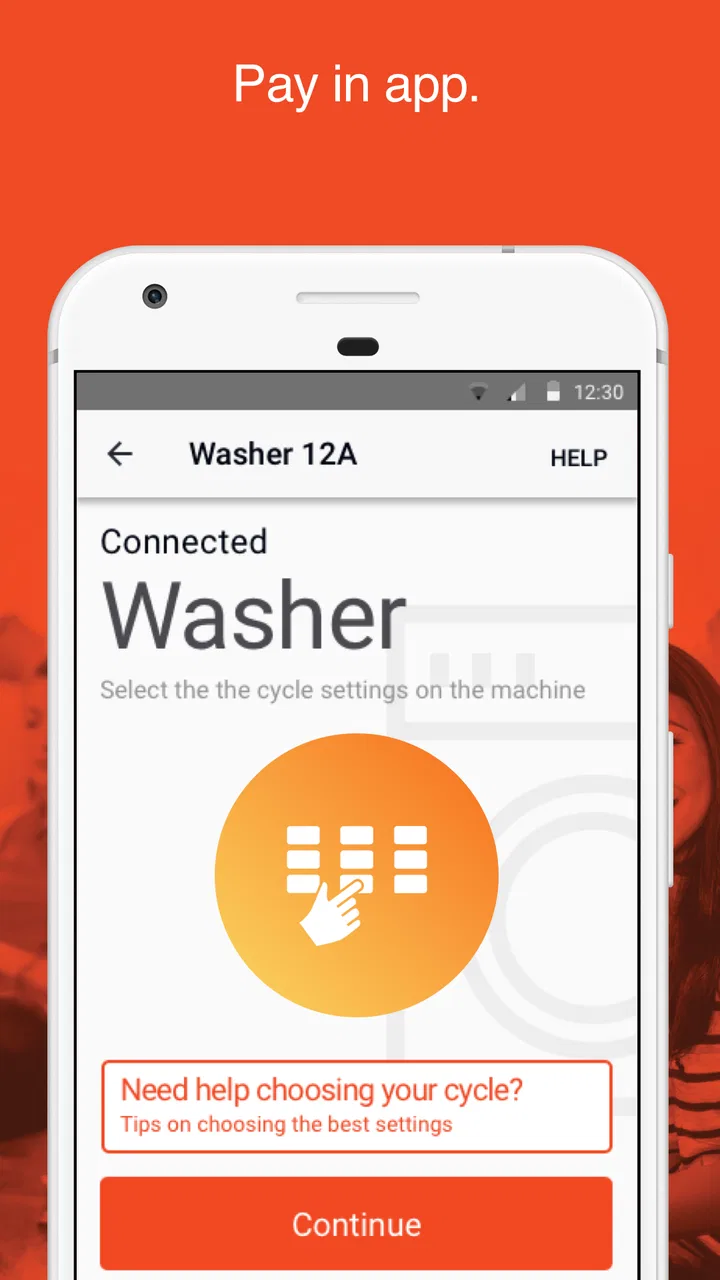
Paying for laundry is the kind of small chore I would rather finish without taking out my wallet, searching for coins, or standing beside a machine while a payment page loads. That is the narrow but useful job of Speed Queen: it is a free Lifestyle app from Alliance Laundry Systems that lets users pay for compatible Speed Queen washers and dryers from a phone. I found it most appealing when the laundry room was busy and I wanted to start a cycle quickly, but the experience depends heavily on getting the correct machine and payment flow in place first.
This is not a general laundry planner, fabric-care guide, or remote-control dashboard. Its value is much more practical: it turns the phone into the payment tool for a supported Speed Queen machine. That focus is a strength because the app does not distract from the immediate task. It is also the main limitation, since anyone expecting detailed cycle management or broad support for unrelated laundry equipment may find it too narrow.
Where the experience usually gets stuck
The first point of friction is understanding what the app is meant to do in the particular laundry room you are using. Seeing Speed Queen machines does not automatically mean every machine, building, or payment arrangement will behave in the same way. The app is designed around paying for a compatible washer or dryer, so the machine and the app need to be part of the same supported setup.
You May Also Like

 Blood Strike: 2.5 Anniversary
Blood Strike’s Loadouts Turn Every Drop Into a Tactical Gamble
A close look at Blood Strike’s custom loadouts: how fast access to signature weapons reshapes its battle royale rhythm, rewards preparation, and narrows the gap between fights.

 Pandora - Music & Podcasts
Pandora’s Music Is Easy to Start, but Harder to Recover
Pandora’s strength is its low-effort path from a seed to a station. Its weak spot is how much confidence it asks you to place in connection, setup, and quiet recovery.

 8 Ball Pool
 Is Built on Rivalries, Rematches, and Routine
A close look at the rivalries, rematches, shared routines, and unanswered safety questions that turn a quick pool match into a persistent mobile community.

 Samsung Music
’s Quiet Strength Is Playing What You Already Own
Its reach comes less from spectacle than from dependable access to a personal library. That simplicity is both the app’s strongest retention engine and its ceiling.

 AccuWeather: Weather Radar
AccuWeather Review: A Quick, Clear Forecast for Everyday Decisions
For everyday plans, the best forecast is the one you can understand quickly. AccuWeather makes rain timing, radar, and local conditions easy to act on, with a few trade-offs.

 Hill Climb Racing
Why Hill Climb Racing Still Turns Crashes Into One More Run
A tiny car, a bumpy hill and one more upgrade: Hill Climb Racing keeps resurfacing because its simple chaos makes every near-miss feel personal.
More From Our News Desk



In practice, I would begin by looking at the machine itself and following the payment instructions displayed there rather than opening the app and tapping around at random. This simple habit matters because a shared laundry room can contain several similar machines. Choosing the wrong washer or dryer can create confusion before any payment problem has actually occurred.
Another common snag is treating a delayed screen as proof that the payment failed. Shared laundry rooms can have weak mobile reception, crowded networks, or people moving quickly between machines. If the app pauses, I would first check whether the machine changed state, whether the payment screen updated, and whether the cycle appears to have started before trying again. Repeating a payment immediately is not a good recovery method when the first attempt may still be processing.
The app has a 4.4 average from around eight and a half thousand ratings, with roughly two and a half thousand written reviews. That level of public use makes it easier to see why the app can be convenient for some people while still producing frustration in particular laundry-room setups. A smooth experience depends on more than the app’s interface: the phone, connection, machine, and payment process all have to line up.
I also would not assume that a problem with one machine proves the whole app is broken. A washer may be unavailable, occupied, out of service, or unable to accept a transaction for a reason outside the phone application. The best first step is to read the machine’s own message and compare it with what the app is showing.
What to check before starting a cycle
Before arriving at the laundry room, I would make sure the phone is running a supported operating system. The app requires Android 6.0 or later, and the current version is 4.0.2. Keeping the app updated is sensible because payment workflows can be sensitive to changes in the operating system or the service around the machine, even when the visible interface looks simple.
I would also check the basics that are easy to overlook: the phone has enough battery, the chosen payment method is available, and mobile data or Wi-Fi is working. This is not glamorous preparation, but it prevents the most annoying situation—having a full load ready while discovering that the phone cannot complete the payment.
When I am in a shared laundry room, I prefer to stand close enough to identify the exact machine before beginning. Similar-looking machines may be arranged in rows, and selecting a neighboring unit is an easy mistake when several people are doing laundry at once. Taking a moment to match the machine information with the app’s selection is more reliable than correcting the error afterward.
It is worth checking whether the machine is ready to accept a payment before loading clothes. If the unit shows an error, is already running, or has a visible service message, moving to another machine may be faster than trying to force the app to work with it. The application can help with payment, but it cannot make an unavailable washer usable.
For a first use, I would avoid making the app part of a rushed laundry trip. Open it at home, become familiar with the sign-in and payment screens, and make sure the phone is ready before carrying a basket downstairs. That small rehearsal reduces the chance of learning the workflow while a queue is forming behind you.
A realistic laundry-room routine
Imagine arriving after work with a load that needs washing before the evening. I would first inspect the available Speed Queen machines, choose an empty compatible washer, and note its identifying information. I would then open the app, select the matching machine, and review the payment step carefully instead of tapping through automatically.
After submitting payment, I would look at both the phone and the washer. The useful confirmation is not just a completed screen in the app; the machine should also respond in the expected way. If the washer does not change state, I would wait briefly and inspect for an error before attempting another transaction. This two-sided check is one of the most important habits because it helps distinguish a display delay from a genuinely unsuccessful payment.
Once the cycle is running, I would keep the phone available until I am satisfied that the transaction and machine have matched correctly. Then the app has done its job and I can leave rather than hovering over the controls. For dryers, I would use the same routine: identify the correct unit, confirm the selection, complete payment, and verify the machine’s response.
The phone-based workflow is especially useful for people who rarely carry cash or who dislike handling coins while carrying laundry. It can also be helpful for someone with limited mobility, since avoiding a coin-operated process may make the room easier to navigate. The benefit is modest but real: fewer objects to manage while moving a heavy basket.
Recovering when a payment or machine response looks wrong
If the app appears stuck, I would not immediately uninstall it or submit the same payment several times. First, I would check whether the phone still has a connection and whether the machine displays any change. Closing and reopening the app may help with a temporary screen problem, but I would do that only after noting what happened so I do not lose track of the selected machine or transaction state.
If the machine did not start, I would move through the recovery process in a controlled order: verify the machine identity, check the machine’s own message, confirm that the app shows the intended selection, and then try again only when it is clear that the first attempt did not complete. This approach is slower than tapping repeatedly, but it reduces the risk of paying twice or starting the wrong unit.
A useful practical tip is to take a screenshot of a confusing payment or error screen for your own records. I would not treat a screenshot as proof that a cycle started, but it can help explain the sequence if assistance is needed later. Recording the machine number, approximate time, and what the washer or dryer displayed is more useful than simply saying that “the app failed.”
If the app closes unexpectedly, I would restart it and repeat the selection carefully rather than assuming the previous screen was preserved. I would also check whether the phone has enough free resources to keep the app open, especially if many other applications are running. These are general phone checks, not guarantees, but they are safe first steps before escalating the problem.
When the issue continues, the machine’s instructions and the laundry-room operator are important sources of help. The app handles the phone side of the payment, while the property or laundry operator may control the machines, their availability, and local procedures. Knowing that distinction prevents wasted time blaming the wrong part of the system.
When the app is not the cause
Some failures will look like app failures because the phone is the most visible part of the process. A washer with a mechanical fault, a disconnected machine, a full or unavailable service, or a problem with the local payment setup can all interrupt the experience. If several people cannot use the same machine, or the machine shows a physical error, the evidence points away from the app.
The same applies to a poor connection. If other phone services are also slow in the laundry room, the app may simply be waiting for communication that the network cannot provide reliably. Moving to a place with a stronger signal, switching between available connection options, or waiting for the network to recover may help. I would avoid changing several phone settings at once because that makes it harder to tell what solved the problem.
Payment authorization can also be separate from the application’s interface. A declined or interrupted payment does not necessarily mean the machine or app has malfunctioned. Checking the payment method through its normal provider channel, when appropriate, is a better next step than repeatedly selecting the same machine.
There is another important boundary: this app is not a replacement for the machine’s physical controls or maintenance process. If a washer does not fill, drain, lock, heat, or operate correctly, the right response is to stop using that machine and follow the local reporting procedure. Continuing to pay through the phone will not repair a mechanical problem.
This is where the app compares differently with the usual alternatives. Coins are more independent of phone battery and mobile reception, but they are inconvenient and may be unavailable when needed. A card terminal at the laundry room can be quicker for someone who prefers not to create a phone-based workflow, while the app is more attractive to someone who already keeps payment tools on a phone. Cash, card, and app each move the weak point somewhere else; the app’s weak points are connectivity, device readiness, and compatibility with the specific laundry setup.
Who will appreciate it, and who should skip it
I think the app is a good fit for residents, students, travelers, and families who regularly use supported Speed Queen laundry machines and want a cash-free way to begin a cycle. It is also sensible for people who already carry a phone everywhere and would rather keep laundry payments in the same place as other everyday tasks.
The app is less convincing for someone who uses many different brands of washers and dryers. Its purpose is specific, so it will not turn an unrelated machine into a supported one. It may also be a poor choice for a person whose phone is often low on battery, whose laundry room has unreliable reception, or who strongly prefers a physical payment method that works without an application.
People who expect remote monitoring, automatic detergent management, detailed laundry records, or appliance controls should adjust their expectations. The central benefit is payment convenience, not a complete smart-home laundry system. For that reason, I would recommend it only when the local machines support the workflow and the user values phone payment enough to accept the extra setup.
The app is free and rated for Everyone, which makes it approachable for a broad audience. Alliance Laundry Systems is the developer, and the product has passed one million installs, so it is not an obscure experiment. Still, popularity does not remove the need to check the actual laundry room. A widely installed app can remain unsuitable if the machines where you live use another payment method.
My practical verdict
After looking at the complete workflow, I see Speed Queen as a focused utility rather than an essential lifestyle companion. It solves one repetitive problem well when the surrounding conditions are right: paying for a compatible washer or dryer without relying on coins. The best experience comes from identifying the machine carefully, preparing the phone before arriving, and confirming the machine’s response instead of trusting a single screen.
My strongest recommendation is to treat the first use as a setup check, not an emergency shortcut. Confirm that the laundry room supports the app, learn where the machine identifier appears, and keep an alternative payment option available until you know the process is dependable there. That small amount of preparation matters more than searching for hidden settings.
I would recommend downloading it to regular users of supported Speed Queen equipment, particularly anyone who values a quicker cash-free routine. I would skip it if the local machines do not clearly support phone payment or if a physical card and coin option already works better for your habits. In those cases, the app adds another dependency without solving a real problem.
For the right laundry room, however, the trade-off is reasonable. The app is free, the purpose is clear, and the current version gives Android users on version 6.0 or later a straightforward way to handle payment from a phone. Its real strength is not doing everything; it is removing one annoying step from a very specific chore. That makes it worth trying, provided you verify compatibility first and know how to separate a payment issue from a machine or connection problem.
FAQs for Speed Queen
01What is Speed Queen, and what can I use it for?
Speed Queen is generally associated with laundry equipment and services, but the exact purpose of an app using this name may vary by region and developer. Before downloading, check its official store description to confirm whether it supports machine control, laundry-location searches, account management, payments, service requests, or product information. The available features can differ depending on your country and compatible equipment.
02Is Speed Queen free to download and use?
The Speed Queen app may be free to download, but some functions can involve additional costs. For example, laundry cycles, payments, service appointments, or purchases are normally charged separately when applicable. Review the app-store listing and payment screen carefully before confirming any transaction. Also check whether your bank, mobile provider, or local laundry operator adds fees.
03Does Speed Queen work with every washing machine or dryer?
Compatibility is one of the most important points to check before installing Speed Queen. Some features may only work with selected connected machines, participating laundromats, or equipment fitted with specific technology. If you are using a home appliance, verify the model number and supported region. Users with older or non-connected machines may have access only to general information or limited services.
04What permissions and personal information does Speed Queen require?
Depending on the features available in your region, Speed Queen may request access to information such as your email address, location, payment details, device notifications, or account credentials. Location may be needed to find nearby laundry facilities, while notifications can provide cycle or service updates. Read the privacy policy and permission prompts carefully, and disable any access that is not necessary for the features you intend to use.
05What should I do if Speed Queen does not connect, process a payment, or show my laundry status?
First, confirm that your internet connection is working and that Bluetooth, location services, or notifications are enabled if the feature requires them. Make sure the machine or laundry location is supported and that the app is updated to the latest version. Restarting the app and signing in again can resolve temporary problems. If the issue continues, use the in-app help or official Speed Queen support, keeping your account and machine details available.
Pros
- Simple controls make laundry settings easy to understand.
- Useful for checking cycle progress without staying near the machine.
- Can help reduce waiting time when managing several loads.
- Clean
- straightforward interface with little unnecessary clutter.
- Convenient for users familiar with Speed Queen connected appliances.
Cons
- Features may be limited if you do not own a compatible Speed Queen appliance.
- Requires a stable internet connection for reliable remote updates.
- Some functions may vary depending on the washer or dryer model.
- Remote controls can be less useful in shared laundry spaces.
- Initial pairing may take time if the appliance or network is not detected.

Speed Queen
Gallery